
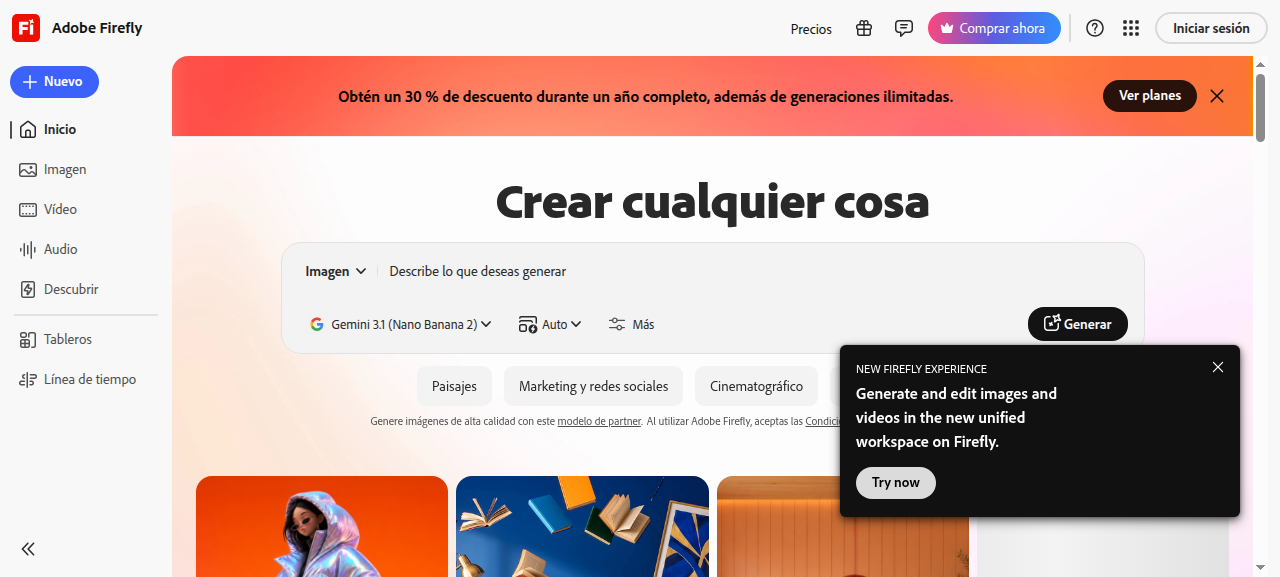
What is Adobe Firefly?
Adobe Firefly is Adobe’s generative AI platform for creating images, vectors, video, and audio using text prompts. Unlike most AI image tools trained on scraped web data, Firefly was trained exclusively on licensed content and public domain material — making it one of the few AI generators built from the ground up with commercial use in mind.
It integrates natively across the Creative Cloud ecosystem (Photoshop, Illustrator, Premiere Pro) and is also available as a standalone web app at firefly.adobe.com. The core technology powers features like Generative Fill, Text to Image, Generative Expand, and text-to-vector generation.
Key Features
- Text to Image: Generate high-quality images from text prompts with style, lighting, and composition controls.
- Generative Fill & Expand: Remove, replace, or extend parts of existing images contextually inside Photoshop.
- Text to Vector: Convert prompts into editable SVG vector graphics inside Illustrator.
- Text to Video: Generate short video clips from text descriptions (available on select plans).
- Custom Models: Enterprise tiers allow training Firefly on your own brand assets for on-brand output at scale.
- Adobe Brand Intelligence: Business-tier feature for consistent brand-aligned content generation.
- Generative Credits: A metered system that allocates a monthly credit budget per plan — higher-resolution and video outputs consume more credits.
Adobe Firefly Commercial Use License Explained
This is the critical section most buyers need to read carefully. Here is how commercial rights work in practice:
Free tier — personal use only
The free plan gives you a limited monthly allocation of generative credits to experiment with the tool. Output from the free tier is not licensed for commercial use. You cannot legally sell, publish for profit, or use free-tier images in paid client work, advertising, or business materials.
Paid plans — commercial use unlocked
A paid Firefly plan (standalone or through Creative Cloud) unlocks commercial use rights for images generated within your credit allocation. This covers selling the generated images, using them in marketing campaigns, client deliverables, merchandise, and publishing — provided you stay within Adobe’s Terms of Use.
What counts as ‘commercial use’?
Adobe and legal experts interpret commercial use broadly. It includes not just selling images directly, but any business or organizational use: websites, social media for a business, annual reports, fundraising materials for nonprofits, advertising, and product packaging. If your organization benefits financially or operationally from the output, you need a paid plan.
IP indemnification on enterprise plans
Enterprise customers (Adobe Firefly for Business and Firefly API tiers) receive IP indemnification — meaning Adobe will defend you if a third party claims the AI output infringes their intellectual property. This is a significant differentiator from tools like Midjourney or DALL-E, which offer no such protection. For brands running campaigns at scale, this legal backstop materially reduces risk.
Training data transparency
Firefly’s training dataset consists of Adobe Stock images (licensed), openly licensed content, and public domain works. Adobe explicitly excludes content where rights are unclear. This is what makes Firefly’s commercial safety claim credible rather than just marketing language.
One critical caveat
You cannot use Firefly outputs to train your own AI or ML models — this is prohibited under Adobe’s terms regardless of plan tier.
Pricing
Adobe Firefly uses a generative credits model. The amount of output you can produce each month depends on your plan and how credit-intensive each generation type is (video and high-resolution outputs cost more credits than standard images).
- Free: Available with a free Adobe account. Limited monthly generative credits. Personal use only — no commercial rights.
- Firefly standalone paid plan: Unlocks commercial use rights and more credits per month. Check Adobe’s site for current pricing as rates change.
- Creative Cloud plans (Single App or All Apps): Include Firefly credits bundled with the subscription. All Apps gives the highest credit allocation and is the most cost-effective for designers already in the CC ecosystem.
- Firefly for Business / Enterprise: Custom pricing. Adds IP indemnification, custom model training, brand controls, and API access. Contact Adobe sales for a quote.
Verify current credit allocations and prices directly on Adobe’s site before purchasing — Adobe has updated plans multiple times in 2025–2026.
Pros and Cons
Pros
- Trained on licensed data — strongest commercial safety story of any major AI image tool
- IP indemnification available on enterprise plans
- Deep Creative Cloud integration (Photoshop, Illustrator, Premiere Pro)
- Free tier available to test before committing
- Generates editable vectors, not just raster images
- Video and audio generation on select plans
- Custom model training for brand consistency at enterprise scale
Cons
- Commercial use requires a paid plan — free tier is limited to personal experimentation
- Generative credit system can be confusing; video outputs burn through credits quickly
- Image quality and stylistic range still trails Midjourney for pure artistic output
- Enterprise IP indemnification is only on higher-tier business plans, not personal paid plans
- Custom models require significant asset volume to train effectively
- Pricing and credit allocations have changed frequently, making long-term cost planning harder
Who Should NOT Use Adobe Firefly
- Hobbyists on a tight budget who only need personal-use images — free alternatives exist.
- Users who need maximum artistic range — Midjourney consistently outperforms Firefly for highly stylized, fine-art outputs.
- Teams that want unlimited image generation without credit limits — Firefly’s credit model will frustrate high-volume workflows unless you are on the right enterprise tier.
- Developers building standalone AI apps who are not in the Adobe ecosystem — the API adds cost and complexity without the UI integration benefit.
Verdict
Adobe Firefly earns its 8.5/10 for one core reason: it is the most legally defensible AI image generator available for commercial work. The combination of licensed training data and enterprise IP indemnification is unmatched in the market. For marketing teams, agencies, and brands running AI-assisted campaigns, Firefly is the responsible default choice.
The tradeoff is real, though. You must be on a paid plan to use outputs commercially, the credit model adds friction for high-volume users, and for pure image quality, Midjourney still has the edge on artistic range. But if you are already in Creative Cloud, Firefly’s integration alone makes it the obvious pick — and the commercial licensing story removes a meaningful legal risk that other tools leave open.
Recommended for: Creative professionals, marketing teams, agencies, and enterprises needing commercially safe AI-generated content integrated into Adobe’s toolchain.
Sources Checked
- Adobe Firefly Legal FAQs — Enterprise Customers (Adobe.com)
- Adobe Firefly for Business — Adobe’s AI Approach (Adobe.com)
- Adobe Firefly License Guide — LicenseOrg
- Can You Sell Adobe Firefly Images? Commercial Rights & IP Safety 2026 (Terms.law)
- Adobe Firefly Pricing 2026 — TechSifted
FAQ
Can I sell images made with Adobe Firefly?
Yes, but only on a paid plan. Free-tier outputs are for personal use only. With a paid Firefly or Creative Cloud subscription, you can sell or use generated images in commercial work within Adobe’s Terms of Use.
Does Adobe Firefly offer IP indemnification?
IP indemnification is available on Adobe Firefly for Business and enterprise-tier plans. Personal paid plans include commercial use rights but not formal IP indemnification coverage.
Is Adobe Firefly free?
There is a free tier with limited generative credits for personal use. Paid plans are required for commercial use and higher credit allocations.
Can a nonprofit use Adobe Firefly commercially?
Yes — nonprofit or organizational use (annual reports, websites, fundraising) counts as commercial use under Adobe’s terms and requires a paid plan.
Can I use Firefly images to train my own AI model?
No. Adobe explicitly prohibits using Firefly outputs to train external AI or ML models, regardless of which plan you are on.
How do generative credits work?
Each plan includes a monthly credit budget. Standard image generations cost fewer credits; video, high-resolution, and premium outputs cost more. Credits reset monthly and unused credits do not roll over on most plans — verify current terms on Adobe’s site.