

What is Replit AI?
Replit AI is the AI coding assistant built directly into Replit’s browser-based cloud IDE. At its core is Replit Agent — a conversational agent that builds, debugs, and deploys full-stack applications from plain-English prompts. Unlike IDE plugins that bolt AI onto a local setup, Replit AI lives entirely in your browser: no installation, no environment configuration, no Git setup required. You describe what you want, and the agent writes the code, provisions a database, and publishes a live URL — all in one session.
In May 2026, Replit shipped Agent 4, the latest major version, adding parallel task execution and improved automatic merge-conflict resolution. Under the hood, the platform is powered by a combination of Replit’s own proprietary models and Anthropic’s Claude, giving it solid code reasoning on top of tight infrastructure integration.
Key Features
Agent 4 — Parallel Task Execution
Agent 4 can run multiple build tasks simultaneously — constructing the frontend, configuring the backend, and setting up the database in parallel rather than one step at a time. Replit reports that the agent resolves merge conflicts automatically roughly 90% of the time, a meaningful improvement for multi-file projects. This figure is Replit’s own claim and should be weighed accordingly, but testers have noted a real speed increase over previous versions.
Zero-Setup Cloud IDE
Every Replit project runs in a containerized cloud environment. Nothing is installed locally. This is the feature that most separates Replit from tools like Cursor or Claude Code: the entire development environment, runtime, and deployment pipeline live on Replit’s servers, making it uniquely accessible for non-developers.
Full-Stack App Generation from Prompts
The agent handles authentication, databases, frontend UI, and live deployment from a single natural-language description. You iterate by describing changes conversationally. This positions Replit AI directly against other vibe-coding tools like Lovable, Bolt.new, and v0 in 2026’s competitive app-generation space.
Real-Time Multiplayer Collaboration
Replit’s IDE supports multiple users editing the same file simultaneously. The AI agent operates inside this shared environment, so teammates can watch and redirect what the agent is building in real time — useful for pair-programming sessions or async handoffs on small teams.
Powered by Replit Models + Claude
Replit uses a hybrid model approach: its own proprietary models handle infrastructure-aware tasks, while Anthropic’s Claude handles complex code reasoning and generation. The combination aims to balance cost efficiency with output quality on demanding prompts.
Pricing
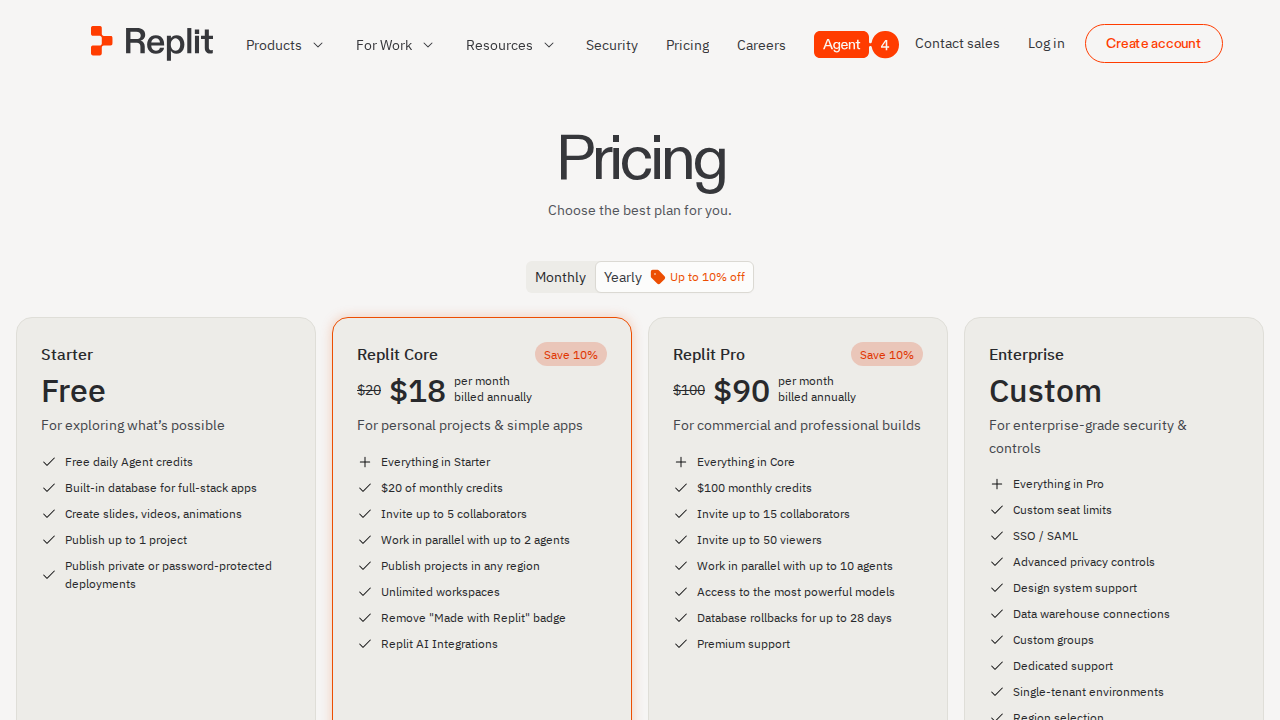
Replit offers a free tier with limited AI agent usage — enough to explore the platform but not for sustained daily development. Paid plans are reported in the range of $20–25 per month, but the real pricing story is the effort-based credit system that governs Agent usage. Complex or long-running agent sessions consume credits proportionally, which means the actual monthly cost can exceed the base subscription price significantly for heavy users. Multiple independent reviewers in 2026 have flagged this credit system as the platform’s most common source of billing surprise.
For light use — weekend prototypes, learning projects, or quick internal tools — the economics are reasonable. For teams building production apps daily, monitor your credit consumption closely before committing.
Pros and Cons
Pros
- Zero setup — runs entirely in the browser, no local environment needed
- Agent 4 parallel execution — faster multi-file builds compared to earlier versions
- Full-stack output — auth, database, frontend, and a live URL from one prompt
- Best-in-class accessibility — genuinely usable by non-coders and first-time builders
- Free tier available — low barrier to evaluate before paying
- Real-time collaboration — multiplayer IDE built in, no extra setup
Cons
- Credit system opacity — heavy agent use pushes costs above the advertised base price
- Limited for large codebases — container constraints make it less suited to enterprise-scale or mature repos
- Less control for experienced developers — advanced Git workflows, custom CI/CD, and fine-grained environment config are restricted versus local tools
- Vendor lock-in — projects live on Replit infrastructure; migrating out requires manual effort
Who Should NOT Use Replit AI
- Senior engineers who need full control over their dev environment, custom toolchains, or complex CI/CD pipelines — Cursor or a local Claude Code setup will serve them better.
- Teams with large existing codebases — importing and iterating on a mature repo inside Replit’s container environment is cumbersome compared to local tools.
- Budget-sensitive builders running long daily agent sessions — the credit system makes monthly costs hard to predict.
- Offline or air-gapped environments — Replit is cloud-only by design; there is no local fallback.
Verdict
Replit AI earns its position as one of the most accessible AI coding platforms of 2026. Agent 4’s parallel task execution and full-stack generation genuinely reduce the time from idea to deployed prototype — especially for non-coders, indie founders, and students who would otherwise spend hours on environment setup. The browser-native experience and free tier lower the barrier to entry as far as it can reasonably go.
The caveat is billing predictability. The credit system makes it difficult to know your real monthly cost before you start building. If you plan heavy agent use, budget above the base plan and track consumption. For everything else — MVPs, internal tools, weekend projects, and learning to code — Replit AI is a strong and well-rounded choice in a crowded field.
Rating: 7.8 / 10
Sources Checked
- Serenities AI — Replit Agent 2026 Review (2-week hands-on test)
- Litmus Tools — Replit Agent Review, June 2026
- AIToolTier — Replit Review 2026
- FlowStep AI — Replit Review: Agent 4 Features and Pricing
- HyzenPro — Replit AI Agent Review 2026
FAQ
Is Replit AI free?
There is a free tier with limited AI agent usage. Sustained development requires a paid plan, currently reported in the $20–25/month range, plus additional credit consumption for agent-heavy sessions.
What is Replit Agent 4?
Replit Agent 4 is the latest version of Replit’s AI coding agent, released in May 2026. It introduces parallel task execution and improved automatic merge-conflict resolution, with Replit reporting roughly 90% of conflicts resolved without manual intervention.
How does Replit AI compare to Cursor?
Replit AI is browser-based and optimized for non-coders building new projects from scratch. Cursor is a local IDE extension that gives experienced developers deeper control over existing codebases. They target different audiences and workflows.
What AI models power Replit?
Replit uses a combination of its own proprietary models and Anthropic’s Claude for code generation and reasoning tasks.
Is Replit good for beginners?
Yes — zero local setup, browser-only access, and natural language prompting make Replit AI one of the most beginner-friendly AI coding tools available in 2026. It is specifically designed for users who want to build apps without learning environment configuration first.